
The WJA training course folder
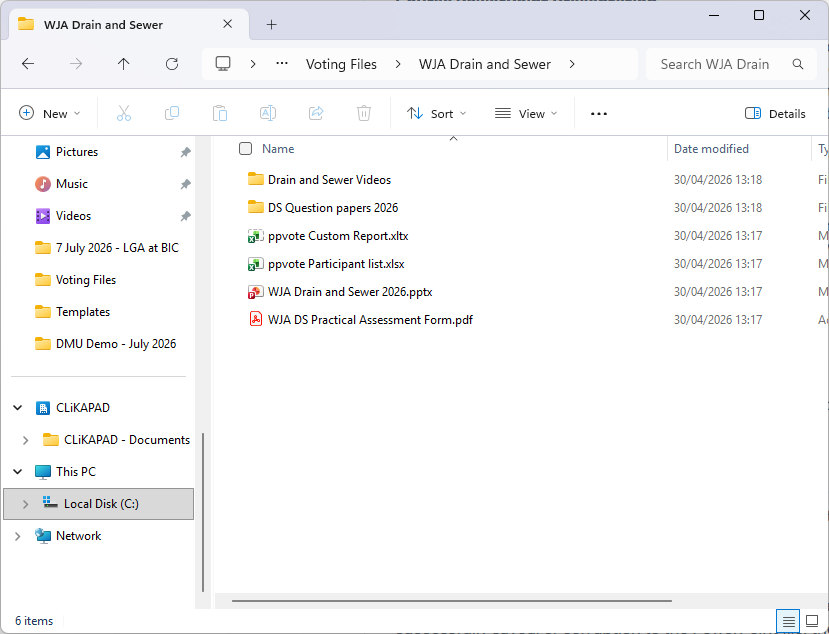
Each course should have its own folder. That folder must be saved in C:/Voting Files. Within the folder you will find all the elements needed to run your course. Please keep all of these items together within one folder. They cannot ‘read’ each other if moved to separate folders.
If you want easy access to the course folders, rather than moving the folders to the desktop, create a desktop shortcut. That will leave the folder in the correct location but give you direct access to it from the desktop.
Course PowerPoint Presentation
The presentation contains the voting questions and links to videos. Each video is saved in the videos subfolder that is in the course folder. If the videos do not play, you may need to update the links. Please take great care not to embed the videos in the presentation. This will cause a large increase to the file size, which may cause PowerPoint to crash during courses.
After each vote, the voting data is saved invisibly to the PowerPoint file. We recommend that at every break you save the presentation.
Please do not move, delete or amend this file. All trainers are required to run the presentation as provided. If you spot any issues/errors, please contact WJA so that these can be reviewed centrally.
REC file
The REC file is a data back up. As you close each vote, the ppvote voting software adds the new voting data to the file. When you initially download the courses, this file will not yet exist. The file is created when you save the first vote.
The file will have the same name as the presentation but will have – Voting Results at the end. For example, if your course file is WJA Drain & Sewer, then the REC will be WJA Drain & Sewer – Voting Results.
The purpose of of the REC is to hold all of the data, so that in the event of data loss on the presentation, such as accidental clearing by the user, a crash where data hasn’t been successfully saved, or corruption to the PowerPoint file, the data can be imported from the REC.
It is recommended that once a trainer has successfully submitted their course results to WJA (and they are totally confident that all data has been successfully included in the Excel) that the REC file is deleted. This will mean that the system will generate a fresh copy the next time the trainer runs that course. Failure to delete the file will result in the results of each course being appended to the data from the last course. This makes it more complex to import the correct data set in the event of data loss in the course PowerPoint.
ppvote Participant list
The participant list is the spreadsheet that holds the trainee data. When you run reports, the voting software will look for this only in the same folder that holds the course presentation. It will look for a file named ppvote Participant list.xlsx. It will ignore any files that are not an exact match.
This file is just a reference file. It doesn’t not interact in any way with the course file or report. When you export to the report, the voting software will read the data from the PowerPoint file, the names and other trainee information from the participant list and the formatting style (your logo etc) from the Custom Report Template.
Changes made to the participant list that are made after the report has been generated will not update anywhere else. If you spot an issue after running the report, you must either correct it in the report itself on all affected pages, or you can delete the report, correct the participant list and then run the report again.
Please do not move, delete or amend this file. If you lose the file, simply take a copy from one of your other course files and paste it into your course folder and then update it to include the current course information before running your report.
Custom Report Template
This file is used only as a design reference for the software to generate your reports. It tells the report what logo, fonts, colours and data to include. Please do not move, delete or amend this file. If you lose the file, simply take a copy from one of your other course files and paste it into your course folder.
Question Papers subfolder
Should you need to resort to a paper test, your question papers can be found in this folder.
Videos subfolder
This folder contains all of the videos used in the course. The course presentation has links to these video files.
Please do not move, delete or amend this folder. If you lose the file, you will need to obtain a copy from a colleague or by downloading your course files again.
Practical Assessment Form
This will be in the folder for any course that has a practical assessment element. This must be completed and submitted to WJA along with the course reports.