
Open the folder where your CLiKAPAD course is saved.
Look for a file with the same name as your PowerPoint file but with the words Voting Results added at the end. If you have File Explorer set to show extensions, you will be able to see that the additional file is a .REC file.
If you don't have file extensions set to display, simply hover over the files with your cursor and you will see details of the file.
When you have found the REC file, right click and choose Open with Notepad. You will see data that looks something like this:
1726 | 19/01/2026,11:30:48,3;2;1;3;4;2;3;2;2;1;
1725 | 19/01/2026,11:32:21,1;2;3;2;2;3;2;2;2;2;
The first part is the question ID, that is how the system knows what the data in the line refers to.
You will then see the date and time of the vote and finally the individual votes all separated by semi colons. Check that the data contains the number of votes per question that you expect. So if you had 3 trainees, it would look like this:
1726 | 19/01/2026,11:30:48,3;2;1;
Check that all the data in the file is for the current date. Delete any lines that are from a different date. The most recent lines are always at the bottom of the file. Once you have made the changes, save and close the notepad file.
Now that you have checked that the data that you have stored is correct, you can move on to importing the REC file.
Go back to your PowerPoint and go to Add-ins > CLiKAPAD > Voting Results > Import / Merge Data. On the Window that opens choose Import from backup rec file and then click Import.
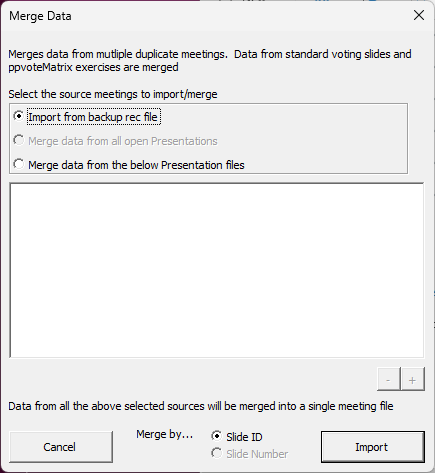
Please note, the results on your slides will not update to show the results, to check that the data has been imported, go to Add-ins > CLiKAPAD > Voting Results > View / Export Data.
If you are at the end of the course, you can now run the report as normal. If you are midway through a course, simply continue from where you left off.
EXPERT NOTES: Once you are confident with this process, you don't need to run the import if you are midway through a course, just check that REC file exists and has the right data. You can import it all when you finish.
To avoid the step of checking that all the data is from today, we recommed that every time you successfully submit your results for a course, you then delete the REC file from your course folder. This will force the system to generate a fresh one the next time you run a course.