
Whether you are a new user and need to install, or you are an existing user but have a new computer, the same steps apply.
There is no need for existing users to remove the software from their old computer. The WJA licence is for use on unlimited computers.
Steps are:
- Register to download (or login if you are a returning user)
- Login and download the installer
- Run the installer, whilst logged in with full admin rights
- Check that the Add-ins menu appears in PowerPoint
- Activate your licence
1. Register to download - using the name and email address of the WJA trainer, complete the registration form at https://downloads.clikapad.com/register.php. Please note, you do not need to confirm the name and email address with CLiKAPAD first, it will be added when you register online.
2. Login to the downloads site at https://downloads.clikapad.com/. There is a button on the login page in case you have forgotten your password. The support team at clikapad do not have access to passwords.
3. Click the downloads button to download the installer. After downloading you will find a file in your downloads folder which includes the version number of the software. For example: ppvote_setup_v5_2_0.exe
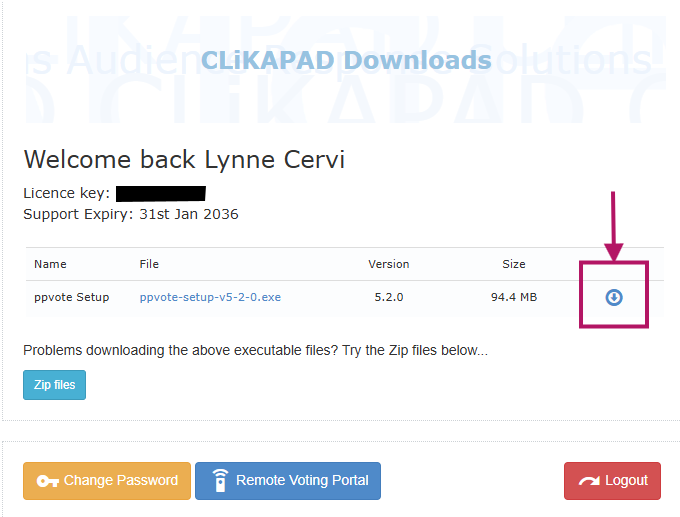
4. Run the installer - ensure you are logged in with admin rights (you may need IT to do this for you) and run the installer exe file.
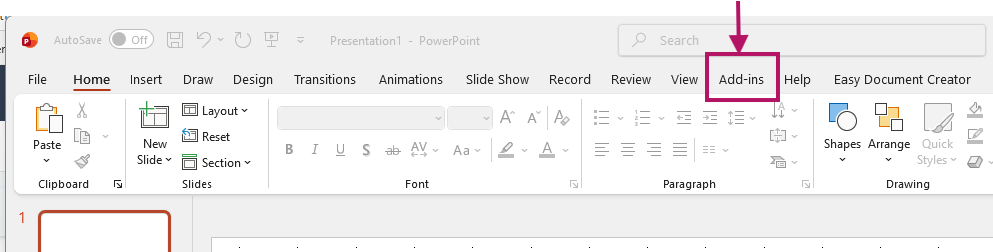
5. Check it installed - Open PowerPoint and check that there is a menu item called Add-ins in your ribbon bar.
6. Activate your licence which is 2205030500
1. Load PowerPoint and select the CLiKAPAD menu from the Add-ins tab > About v5.2 > Register > Retrieve License.
2. Enter your email address and the above license number.
3. Click the "Online License" button.
4. You will be prompted to confirm this is the correct license.
5. Once confirmed click the "Activate" button to apply the license.
Email wja@clikapad.com if you have any installation issues.