Keep your files together in one folder: PowerPoint course presentation, ppvote participant list, and the custom report template.
Do not modify the layout or structure of the template, as this could interfere with automated data population.
Preparing the Participant List
This is now used in place of a separate sign in sheet.
Fill in trainee details before the course and theory/practical results after the course. In PowerPoint go to Add-ins > CLiKAPAD > Set up > Participants/keypad names. This will open and Excel file that has the required columns for WJA number etc. If it opens a basic version with only keypad numbers and weightings, it means that it cannot find the file, so has created a new one. You need to have a file in the folder called ppvote Participant list. The file is included in the folder for each course that is supplied by WJA. The file must remain in the same folder as the course and must NOT be renamed.
Checking the scores
Before practical assessments, review theory results to verify all trainees passed with at least 80%. You can do this by going to Add-ins > CLiKAPAD > Voting Results > View / Export to Excel. No need to actually export to Excel at this stage though. Just click on the Results by keypad button and check that everyone has achieved a score of 80% or more.
Running the Custom Export
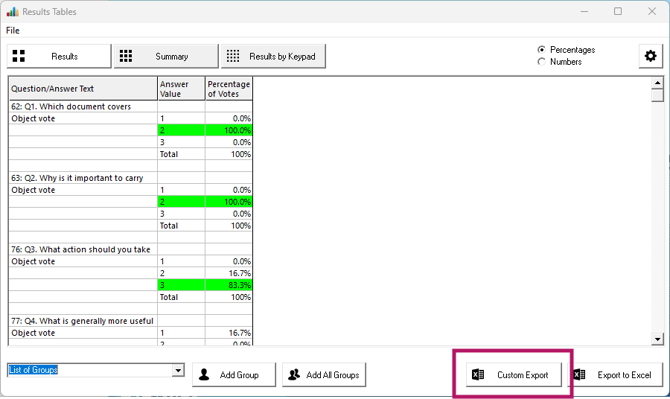
To run a custom report go to Add-ins > CLiKAPAD > Voting Results > View / Export Data to Excel. You’ll then see a button called 'Custom Export'. Name the report and save it in the same folder as your presentation. After export, we recommend that you move reports to a server or cloud location. Alternatively, save a backup copy to an external drive.
Understanding the Output
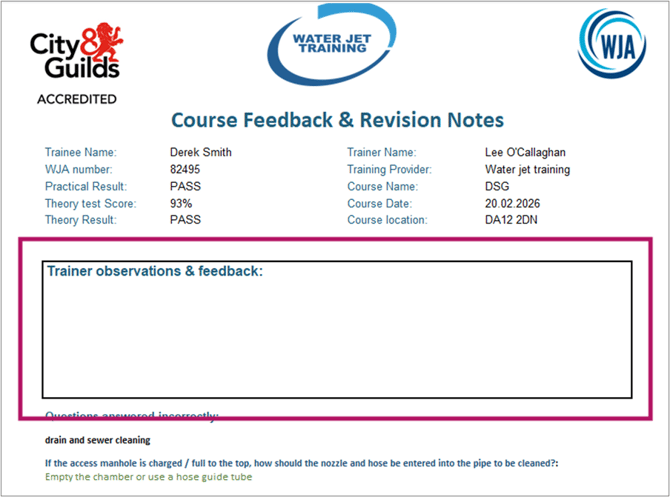
The export will include a feedback sheet for each trainee within Excel. It will also include a summary sheet that shows all trainees on one page, with their test scores and a list per trainee of each question answered incorrectly.
The results by keypad sheet is used by the WJA office team and includes the data that used to be captured in the sign-in sheet but now added to the ppvote Participant List. Please submit the entire workbook to the office.
Final Steps Before Sending Reports
On each individual feedback sheet, there is a box to add trainer observations and practical feedback. Those sheets and the summary sheet should be saved as PDF files before issuing to clients or trainees.